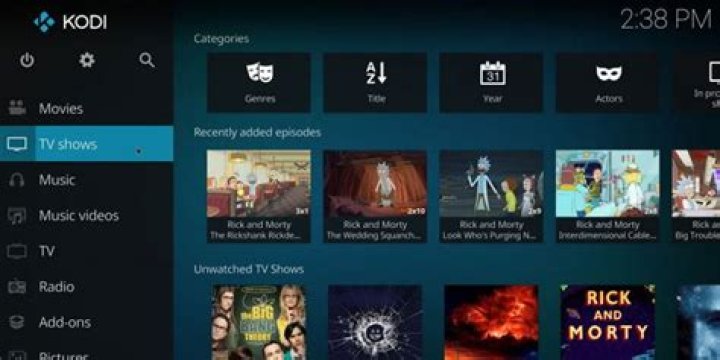
In the world of movie streaming, Kodi stands out as the ultimate powerhouse, offering unparalleled flexibility and access to a vast library of content. Whether you're a casual viewer craving the latest blockbusters or a cinephile hunting for rare classics, Kodi transforms your device into a personal cinema. This comprehensive guide dives deep into everything you need to know about streaming movies with Kodi, from initial setup to advanced addons and optimization tips. By the end, you'll be equipped to enjoy seamless, high-quality movie streaming like never before, positioning Kodi as your go-to solution for all things cinematic.
Kodi's open-source nature means it's free to use across multiple platforms, including Windows, macOS, Linux, Android, iOS, and even Raspberry Pi. Unlike rigid streaming services with subscriptions and regional locks, Kodi lets you customize your experience with addons tailored specifically for movie streaming. Say goodbye to buffering woes and hello to 4K ultra-HD playback right from your living room setup.
What is Kodi and Why It's the Best for Movie Streaming
Kodi is a free, open-source media center application developed by the XBMC Foundation. Originally designed for Xbox, it has evolved into a versatile platform that excels in organizing and playing media files, including movies, TV shows, music, and more. What makes Kodi the best choice for movie streaming is its extensive ecosystem of addons—community-built extensions that pull content from various online sources.
Unlike apps like Netflix or Hulu, which limit you to their catalogs, Kodi aggregates content from free, legal sources worldwide. For movie enthusiasts, this means instant access to thousands of titles without monthly fees. Kodi supports advanced features like subtitle downloads, trailer previews, and metadata scraping from databases like The Movie Database (TMDB), ensuring your library looks professional and is easy to navigate.
Key advantages of Kodi for movie streaming include:
- Cross-platform compatibility: Runs on almost any device, from smart TVs to fire sticks.
- Customizable skins and interfaces: Tailor the look to match your streaming preferences.
- Hardware acceleration: Smooth playback of high-bitrate 4K movies on modest hardware.
- Live TV and PVR support: Beyond movies, integrate cable or IPTV for a complete entertainment hub.
- Privacy-focused: No tracking or ads from the core app itself.
With Kodi, movie streaming becomes a personalized adventure, far superior to cookie-cutter streaming platforms.
System Requirements and Downloading Kodi
Before diving into setup, ensure your device meets Kodi's minimal requirements. Kodi 20 "Nexus" (the latest stable version) runs smoothly on:
- Windows 10/11 (64-bit recommended)
- macOS 10.15 or later
- Android 5.0+
- Linux distributions like Ubuntu
- At least 1GB RAM and a dual-core CPU for HD streaming; 4GB+ for 4K
Download Kodi exclusively from the official website, kodi.tv, to avoid malware-ridden fakes. Select your platform, grab the installer, and you're set. For Android users, sideload the APK via Downloader app on Fire TV devices—search for "kodi.tv download" in the app.
Pro tip: Always verify the file's SHA256 checksum from the download page for security. Installation is straightforward: run the EXE on Windows, drag to Applications on macOS, or install via package managers on Linux.
Initial Setup of Kodi for Optimal Movie Streaming
Launching Kodi for the first time reveals its intuitive wizard. Here's a step-by-step Kodi setup guide:
- Language and Region: Select English (or preferred) and your timezone.
- Media Sources: Add local folders for your ripped Blu-rays or downloads. Use "Browse" to point to your movie directory.
- Scrapers: Choose TMDB or Universal Movie Scraper for automatic artwork, synopses, and cast info. This is crucial for a polished movie library.
- Weather and Look and Feel: Install the popular Estuary skin for a modern interface optimized for big screens.
- Services: Enable UPnP for network streaming and remote control via apps like Yatse.
After setup, navigate to Videos > Files to browse your movies. Kodi's library mode scans and organizes everything automatically, making movie streaming effortless.
Best Kodi Addons for Movie Streaming in 2023
Addons are Kodi's secret sauce for movie streaming. Stick to the official repository for legal, safe options, but for broader access, explore trusted third-party repos. Here are the top Kodi addons for movies:
Official Repository Gems
- UMC (Universal Movie Scraper): Enhances metadata for perfect library organization.
- YouTube: Official integration for movie trailers and free full-length films.
- Plex: Syncs with your Plex server for seamless streaming.
Top Third-Party Addons for Movies
For expansive movie streaming, install these via their repositories (always use a VPN like ExpressVPN for privacy):
- The Crew: All-in-one addon with sections for 4K movies, CAM/TS releases, and trending films. Supports Real-Debrid for premium links.
- Seren: Premium movie streaming with Trakt integration. Pairs perfectly with Real-Debrid for buffer-free 1080p/4K.
- Venom: Lightweight scraper pulling from multiple hosts, ideal for rare movies.
- Magic Dragon: Free links galore, including anime and documentaries.
- Asgard: Norse-themed addon with robust movie categories and kids' sections.
Real-Debrid integration elevates Kodi movie streaming to pro levels—unlimited bandwidth, cached torrents, and 99% uptime. Sign up at real-debrid.com and authorize in addon settings.
How to Install Addons on Kodi Step-by-Step
Installing addons is simple via zip files or repositories. First, enable unknown sources: Settings > System > Add-ons > toggle "Unknown sources."
- From Zip: Download repo zip (e.g., The Crew Wizard from trusted GitHub). Add-ons > Install from zip file > select file.
- From Repository: After repo install, Add-ons > Install from repository > choose addon.
- Dependencies: Most auto-install URLResolver or ResolveURL for link scraping.
For movie streaming prowess, install The Crew: Grab the repo zip, install, then from repository > The Crew Repo > Video add-ons > The Crew. Scrape movies in seconds!
Optimizing Kodi for Smooth Movie Streaming
To banish buffering and maximize quality:
- Builds and Wizards: Use No Limits Magic or Diggz Xenon for pre-configured setups with top addons.
- Cache Settings: In advanced settings.xml, increase memory cache to 50% of RAM.
- Playback Tweaks: Enable DVDPlayer as default, adjust refresh rate to match video.
- VPN Essential: NordVPN or Surfshark hides your IP during streaming.
- Hardware Upgrades: External players like VLC via Kodi or CoreELEC on Raspberry Pi for 4K HDR.
Advanced users: Edit guisettings.xml for auto-playing next episode and subtitle preferences. With these optimizations, Kodi delivers cinema-grade movie streaming.
Troubleshooting Common Kodi Issues for Movie Streaming
Encounter problems? Common fixes:
- No Streams: Update ResolveURL, clear providers, or switch hosts.
- Buffering: Increase cache, use wired Ethernet, or Real-Debrid.
- Addon Crashes: Force close Kodi, clear app data, reinstall.
- Black Screen: Disable hardware acceleration in player settings.
Check Kodi forums or Reddit's r/Addons4Kodi for latest fixes. Regular updates keep Kodi running flawlessly.
Legal Considerations for Kodi Movie Streaming
Kodi is 100% legal—it's just a player. Addons from official repos are safe. For third-party, use legitimate sources like public domain archives or your own media. Pair with Real-Debrid (legal cache service) to avoid sketchy hosts. Always respect copyrights; Kodi shines brightest with ethical streaming.
Conclusion: Elevate Your Movie Nights with Kodi
From setup to addons and beyond, Kodi reigns supreme as the best platform for movie streaming. Its versatility, community support, and endless customization make it unbeatable for cord-cutters. Download Kodi today, install top addons like The Crew or Seren, optimize for your setup, and unlock a world of cinematic bliss. Whether binge-watching Marvel epics or indie gems, Kodi delivers the ultimate streaming experience—free, flexible, and fantastic.
Ready to transform your entertainment? Fire up Kodi and start streaming movies like a pro. With this guide, you're set for years of uninterrupted viewing pleasure.